

WalletConnect Pay via WalletKit - Kotlin
Integrate WalletConnect Pay through WalletKit for a unified payment experience in your Android wallet.
This documentation covers integrating WalletConnect Pay through WalletKit. This approach provides a unified API where Pay is automatically initialized alongside WalletKit, simplifying the integration for wallet developers.
Sample Wallet
For a complete working example, check out our sample wallet implementation:
Sample Wallet - Kotlin (WalletKit)
A reference Android wallet app demonstrating WalletConnect Pay via WalletKit.
Using AI for Integration? If you're using an AI IDE or assistant to help with integration, you can provide it with our comprehensive AI integration prompt for better context and guidance.
Requirements
- Min SDK: 23 (Android 6.0)
- WalletKit: 1.9.0+ (
com.reown:walletkit) - WalletConnect Pay: 1.3.0+ (
com.walletconnect:pay, bundled with WalletKit; ships yttrium-wcpay 0.10.60). Required for thedataparameter inconfirmPayment.
You also need a WCP ID for your project, obtained from the WalletConnect Dashboard.
How to obtain a WCP ID
- Navigate to the WalletConnect Dashboard.
- Select the project that is associated with your wallet (as in, the projectId that is being used for your wallet's WalletConnect integration).
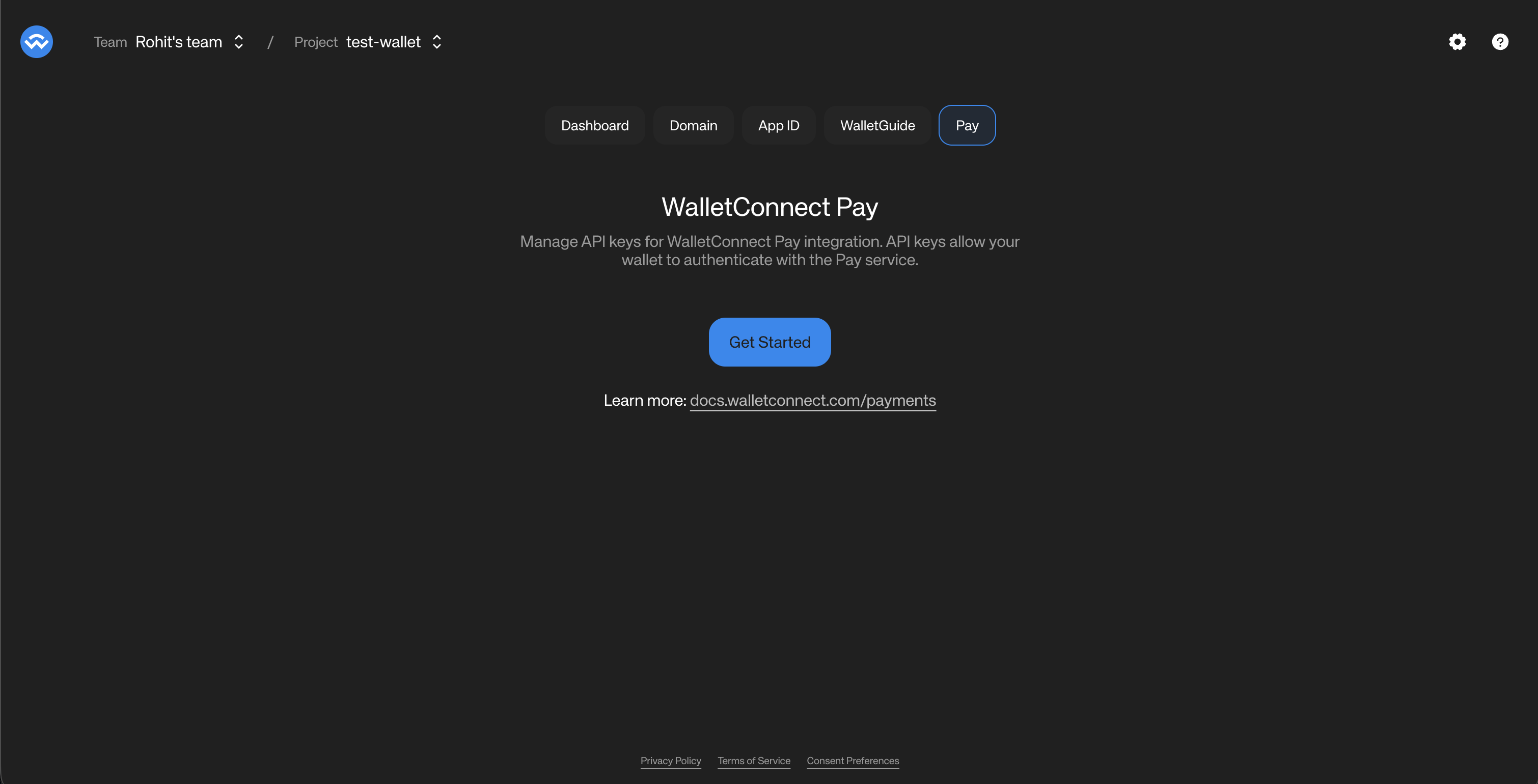
- Click on the "Get Started" button to get a WCP ID associated with your project.
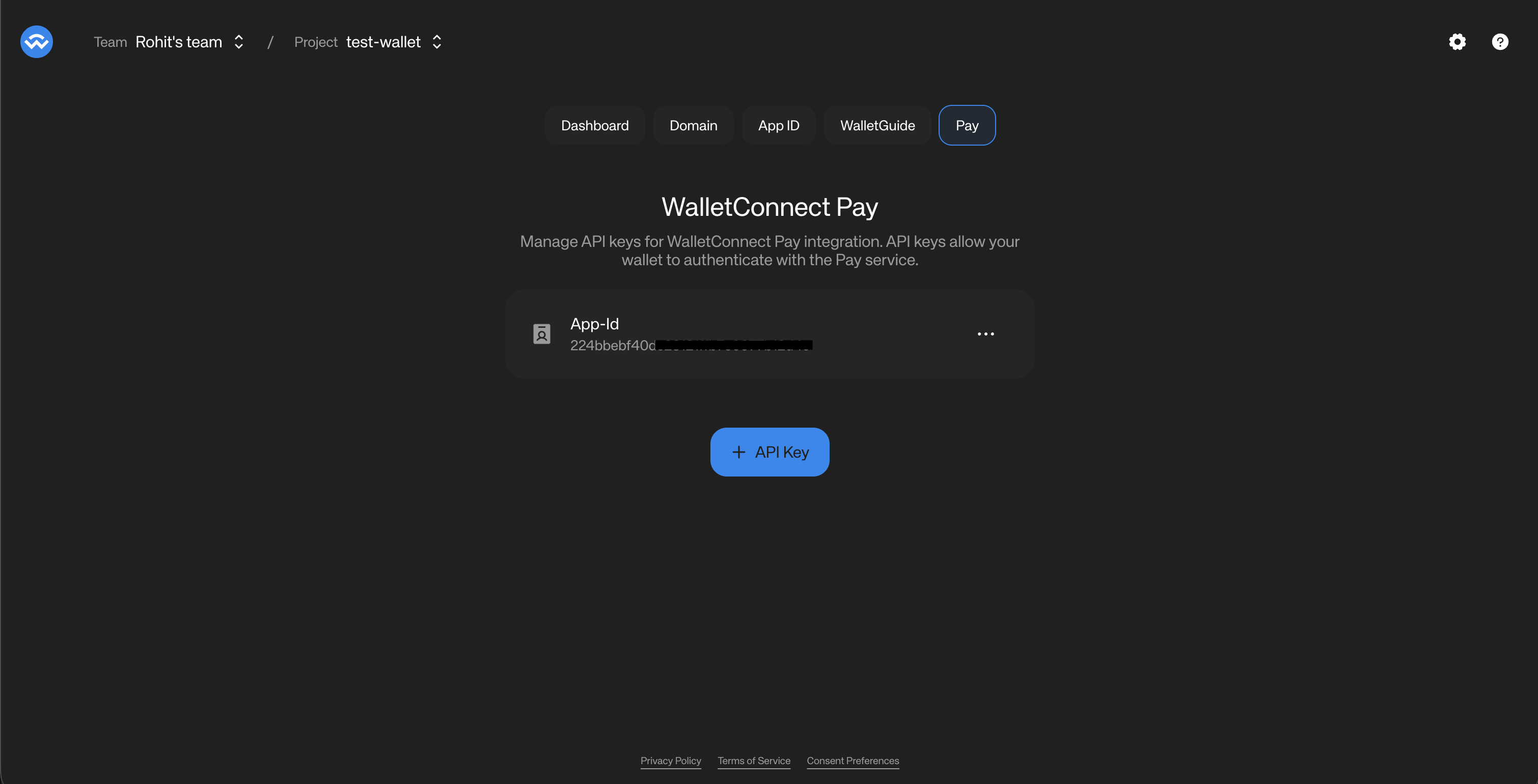
- The Dashboard will now show the WCP ID associated with your project.
- Click on the three dots on the right of the WCP ID and select "Copy WCP ID". You will be using this for your wallet's WalletConnect Pay integration.
Installation
First, add the required repositories to your project's settings.gradle.kts or root build.gradle.kts:
allprojects {
    repositories {
        mavenCentral()
        maven { url = uri("https://jitpack.io") }
    }
}
Then add WalletKit to your app's build.gradle.kts using the BOM (Bill of Materials):
releaseImplementation(platform("com.reown:android-bom:$BOM_VERSION"))
releaseImplementation("com.reown:android-core")
releaseImplementation("com.reown:walletkit")
WalletConnectPay is automatically included as a dependency of WalletKit.
Check the GitHub releases for the latest BOM version.
Initialization
WalletConnectPay is automatically initialized when you initialize WalletKit. No additional setup is required.
import com.reown.android.Core
import com.reown.android.CoreClient
import com.reown.walletkit.client.WalletKit
import com.reown.walletkit.client.Wallet

// First, initialize CoreClient in your Application class
val projectId = "" // Get Project ID at https://dashboard.walletconnect.com/
val appMetaData = Core.Model.AppMetaData(
    name = "Wallet Name",
    description = "Wallet Description",
    url = "Wallet URL",
    icons = listOf(/* list of icon url strings */),
    redirect = "kotlin-wallet-wc:/request" // Custom Redirect URI
)

CoreClient.initialize(
    projectId = projectId,
    application = this,
    metaData = appMetaData,
)

// Then initialize WalletKit
val initParams = Wallet.Params.Init(core = CoreClient)

WalletKit.initialize(initParams) { error ->
    // Error will be thrown if there's an issue during initialization
}
The Pay SDK is initialized internally with:
wcpIdfrom your WalletConnect Project IDpackageNamefrom your application context
For more details on WalletKit initialization, see the WalletKit Usage documentation.
Payment Link Detection
Use WalletKit.Pay.isPaymentLink() to determine if a scanned URI is a payment link or a standard WalletConnect pairing URI:
fun handleScannedUri(uri: String, accounts: List<String>) {
    if (WalletKit.Pay.isPaymentLink(uri)) {
        // Handle as payment - call getPaymentOptions
        WalletKit.Pay.getPaymentOptions(uri, accounts)
    } else {
        // Handle as WalletConnect pairing
        WalletKit.pair(Wallet.Params.Pair(uri))
    }
}
Payment Flow
The payment flow consists of six main steps:
Detect Payment Link -> Get Options -> Collect Data (if required) -> Get Actions -> Sign Actions -> Confirm Payment
Get Payment Options
Retrieve available payment options for a payment link:
import com.reown.walletkit.client.WalletKit
import com.reown.walletkit.client.Wallet

viewModelScope.launch {
    val result = WalletKit.Pay.getPaymentOptions(
        paymentLink = "https://pay.walletconnect.com/pay_xxx",
        accounts = listOf(
            "eip155:1:0xYourAddress",      // Ethereum
            "eip155:8453:0xYourAddress",   // Base
            "eip155:10:0xYourAddress",     // Optimism
            "eip155:137:0xYourAddress",    // Polygon
            "eip155:42161:0xYourAddress"   // Arbitrum
        )
    )

    result.onSuccess { response ->
        // Payment metadata
        val paymentId = response.paymentId
        val paymentInfo = response.info  // Merchant info, amount, expiry

        // Available payment options
        val options = response.options
        options.forEach { option ->
            println("Option: ${option.id}")
            println("Amount: ${option.amount.value} ${option.amount.unit}")
            println("Account: ${option.account}")
            println("Requires IC: ${option.collectData != null}")
        }
    }.onFailure { error ->
        handleError(error)
    }
}
Collect User Data (If Required)
After the user selects an option, check for collectData on it. If present, collect the data before fetching the required actions.
Embedded Data Collection Form
When a payment requires user information (e.g., for Travel Rule compliance), the SDK returns a collectData field on individual payment options. Each option may independently require data collection — some options may require it while others don't.
The form is loaded from selectedOption.collectData.url and embedded in your wallet (a WebView on mobile, an iframe on web). It handles field rendering, validation, Terms & Conditions and Privacy Policy acceptance, and submits data directly to the backend.
Collect this data before fetching the required actions. For an option that requires Information Capture, getRequiredPaymentActions fails with 400 IC data required until the data has been submitted.
Recommended Flow
The recommended approach is to display all payment options upfront, then handle data collection only when the user selects an option that requires it:
- Call
getPaymentOptionsand display all available options to the user - Show a visual indicator (e.g., "Info required" badge) on options where
option.collectDatais present - When the user selects an option, check
selectedOption.collectData - If present, load
selectedOption.collectData.urlin the embedded form - Optionally append query parameters to the form URL —
prefill(known user data),theme, andthemeVariables(appearance). See Form URL parameters below. Use proper URL building so existing query parameters are preserved. - Listen for completion messages:
IC_COMPLETE(success) orIC_ERROR(failure) - On
IC_COMPLETE, continue the flow — fetch the required actions, sign, and confirm the payment. Don't passcollectedDatatoconfirmPayment(); the form submits data directly to the backend
Decision Matrix
Response collectData | option.collectData | Behavior |
|---|---|---|
| present | present | Option requires IC — use option.collectData.url |
| present | null | Option does NOT require IC (others might) — skip IC for this option |
null | null | No IC needed for any option |
Form URL parameters
The form URL accepts the following optional query parameters. Append them to selectedOption.collectData.url before loading it, preserving any existing query parameters.
| Parameter | Format | Description |
|---|---|---|
prefill | base64url-encoded JSON | Pre-populates known user fields so the user doesn't re-enter them. Keys must match the required fields from collectData.schema (e.g. fullName, dob, pobAddress). |
theme | light or dark | Sets the form's base color mode. |
themeVariables | base64url-encoded JSON | Overrides design tokens to match your brand — font, font size, select colors, button border radius, and input border radius. Generate and export this value from the WalletConnect Pay Dashboard. |
collectData.schema is a JSON schema string — parse it and read its required array to discover the field keys for prefill. For example, a required array of ["fullName", "dob", "pobAddress"] maps to a prefill object of {"fullName": "...", "dob": "...", "pobAddress": "..."}.
Customizing the form appearance
theme and themeVariables are optional and independent — pass either, both, or neither:
themeswitches the form betweenlightanddarkbase color modes. Match it to your wallet's active mode for a seamless transition.themeVariablesapplies brand-level overrides (font, font size, select colors, button border radius, and input border radius). Generate the theme in the WalletConnect Pay Dashboard, export it as a base64url string, and append it to the form URL verbatim — you don't need to encode it at runtime.
The top-level collectData on the payment options response is still available for backward compatibility. However, the per-option collectData is the recommended approach as it provides more granular control over the flow.
Do not pass collectedData to confirmPayment() when using the embedded form. The form handles data submission directly.
// Check per-option data collection requirement after user selects an option
selectedOption.collectData?.let { collectAction ->
    val url = collectAction.url
    if (url != null) {
        // Build prefill URL with known user data
        // Use the "required" list from collectAction.schema to determine which fields to prefill
        val prefillJson = JSONObject().apply {
            put("fullName", "John Doe")
            put("dob", "1990-01-15")
            put("pobAddress", "123 Main St, New York, NY 10001")
        }.toString()
        // Encode prefill as base64url (URL-safe, no padding)
        val prefillBase64 = Base64.encodeToString(
            prefillJson.toByteArray(),
            Base64.NO_WRAP or Base64.URL_SAFE or Base64.NO_PADDING
        )
        val webViewUrl = Uri.parse(url).buildUpon()
            .appendQueryParameter("prefill", prefillBase64)
            // Optional appearance params (see "Form URL parameters"):
            .appendQueryParameter("theme", "dark") // "light" | "dark"
            // themeVariables is a base64url string exported from the Pay Dashboard:
            // .appendQueryParameter("themeVariables", themeVariables)
            .build().toString()

        // Show WebView for this specific option and wait for IC_COMPLETE message
        showWebView(webViewUrl)
    }
}
WebView Message Types
The WebView communicates with your wallet through JavaScript bridge messages. The message payload is a JSON string with the following structure:
| Message Type | Payload | Description |
|---|---|---|
IC_COMPLETE | { "type": "IC_COMPLETE", "success": true } | User completed the form successfully. Proceed to payment confirmation. |
IC_ERROR | { "type": "IC_ERROR", "error": "..." } | An error occurred. Display the error message and allow the user to retry. |
Platform-Specific Bridge Names
| Platform | Bridge Name | Handler |
|---|---|---|
| Kotlin (Android) | AndroidWallet | @JavascriptInterface onDataCollectionComplete(json: String) |
| Swift (iOS) | payDataCollectionComplete | WKScriptMessageHandler.didReceive(message:) |
| Flutter | ReactNativeWebView (injected via JS bridge) | JavaScriptChannel.onMessageReceived |
| React Native | ReactNativeWebView (native) | WebView.onMessage prop |
Get Required Actions
Get the wallet RPC actions needed to complete the payment. Make sure any required data collection has already completed before calling this:
val actionsResult = WalletKit.Pay.getRequiredPaymentActions(
    Wallet.Params.RequiredPaymentActions(
        paymentId = paymentId,
        optionId = selectedOption.id
    )
)

actionsResult.onSuccess { actions ->
    actions.forEach { action ->
        when (action) {
            is Wallet.Model.RequiredAction.WalletRpc -> {
                val rpcAction = action.action
                // rpcAction.chainId - e.g., "eip155:8453"
                // rpcAction.method - e.g., "eth_signTypedData_v4" or "personal_sign"
                // rpcAction.params - JSON string with signing parameters
            }
        }
    }
}.onFailure { error ->
    handleError(error)
}
Sign Actions
Sign each required action using your wallet's signing implementation:
val data = actions.map { action ->
    when (action) {
        is Wallet.Model.RequiredAction.WalletRpc -> {
            val rpc = action.action
            when (rpc.method) {
                "eth_signTypedData_v4" -> signTypedDataV4(rpc.params)
                "personal_sign" -> personalSign(rpc.params)
                "eth_sendTransaction" -> sendTransaction(rpc.params)
                else -> throw UnsupportedOperationException("Unsupported: ${rpc.method}")
            }
        }
    }
}
Signing eth_signTypedData_v4
import org.json.JSONArray
import org.web3j.crypto.ECKeyPair
import org.web3j.crypto.Sign
import org.web3j.crypto.StructuredDataEncoder

fun signTypedDataV4(params: String): String {
    // params is a JSON array: [address, typedData]
    val paramsArray = JSONArray(params)
    val requestedAddress = paramsArray.getString(0)
    val typedData = paramsArray.getString(1)

    // Use StructuredDataEncoder for proper EIP-712 hashing
    val encoder = StructuredDataEncoder(typedData)
    val hash = encoder.hashStructuredData()

    val keyPair = ECKeyPair.create(privateKeyBytes)
    val signatureData = Sign.signMessage(hash, keyPair, false)

    val rHex = signatureData.r.bytesToHex()
    val sHex = signatureData.s.bytesToHex()
    val v = signatureData.v[0].toInt() and 0xff
    val vHex = v.toString(16).padStart(2, '0')

    return "0x$rHex$sHex$vHex".lowercase()
}
Payment options may include multiple actions with different RPC methods. For example, a Permit2 payment where the user lacks sufficient allowance returns two actions: an eth_sendTransaction to approve the token allowance, followed by an eth_signTypedData_v4 to sign the Permit2 transfer. Your wallet must check action.action.method (or rpc.method if you assign the action payload to a local variable) and dispatch to the appropriate handler. For full implementation guidance, see USDT support.
Keep data in the same order as the actions array.
Confirm Payment
Submit the wallet RPC results (data) and finalize the payment. Each element of data is either a plain string (a signature or transaction hash) or, for chains like Tron, a JSON object encoded as a string; WalletConnect Pay forwards each element verbatim to the gateway. See Tron support for the Tron payload.
val confirmResult = WalletKit.Pay.confirmPayment(
    Wallet.Params.ConfirmPayment(
        paymentId = paymentId,
        optionId = selectedOption.id,
        data = data
    )
)

confirmResult.onSuccess { response ->
    when (response.status) {
        Wallet.Model.PaymentStatus.SUCCEEDED -> {
            // Payment completed successfully
        }
        Wallet.Model.PaymentStatus.PROCESSING -> {
            // Payment is being processed
        }
        Wallet.Model.PaymentStatus.FAILED -> {
            // Payment failed
        }
        Wallet.Model.PaymentStatus.EXPIRED -> {
            // Payment expired
        }
        Wallet.Model.PaymentStatus.REQUIRES_ACTION -> {
            // Additional action required
        }
        Wallet.Model.PaymentStatus.CANCELLED -> {
            // Payment cancelled by user
        }
    }
}.onFailure { error ->
    handleError(error)
}
The signatures parameter is deprecated in favor of data and will be removed in a future major version. Existing integrations that pass signatures keep working; the SDK uses it as a fallback when data is omitted.
Data Collection Implementation
When selectedOption.collectData.url is present, display the URL in a WebView. The WebView handles form rendering, validation, and T&C acceptance.
Data Collection Best Practices
- Display prominently: Show the form full-screen or as a prominent modal so users can interact with it easily
- Loading indicator: Show a loading indicator while the form loads
- Handle errors: Listen for
IC_ERRORmessages and display a user-facing error message with an option to retry - External links: Open Terms & Conditions and Privacy Policy links in the system browser rather than navigating within the form
- Domain restriction: Only allow navigation to WalletConnect pay domains and HTTPS URLs
- Back navigation: Handle back/dismiss gracefully — confirm cancellation with the user before closing the form mid-flow
- Keyboard behavior: Test that the soft keyboard appears and behaves correctly when users tap on form inputs
- Theme to match your brand: Pass
theme=lightortheme=darkto match your wallet's active color mode, and apply brand tokens withthemeVariablesexported from the WalletConnect Pay Dashboard. See Form URL parameters.
import android.webkit.JavascriptInterface
import android.webkit.WebView
import android.webkit.WebViewClient
import android.webkit.WebResourceRequest
import android.content.Intent
import android.net.Uri
import android.util.Base64
import androidx.compose.runtime.Composable
import androidx.compose.ui.viewinterop.AndroidView
import org.json.JSONObject

@Composable
fun PayDataCollectionWebView(
    url: String,
    onComplete: () -> Unit,
    onError: (String) -> Unit
) {
    AndroidView(factory = { context ->
        WebView(context).apply {
            settings.javaScriptEnabled = true
            settings.domStorageEnabled = true
            settings.allowFileAccess = false

            addJavascriptInterface(
                object {
                    @JavascriptInterface
                    fun onDataCollectionComplete(json: String) {
                        val message = JSONObject(json)
                        when (message.optString("type")) {
                            "IC_COMPLETE" -> onComplete()
                            "IC_ERROR" -> onError(
                                message.optString("error", "Unknown error")
                            )
                        }
                    }
                },
                "AndroidWallet"
            )

            webViewClient = object : WebViewClient() {
                override fun shouldOverrideUrlLoading(
                    view: WebView?,
                    request: WebResourceRequest?
                ): Boolean {
                    val requestUrl = request?.url?.toString() ?: return false
                    if (!requestUrl.contains("pay.walletconnect.com")) {
                        context.startActivity(Intent(Intent.ACTION_VIEW, Uri.parse(requestUrl)))
                        return true
                    }
                    return false
                }
            }

            loadUrl(url)
        }
    })
}
Complete Example
Here's a complete implementation example:
import com.reown.walletkit.client.WalletKit
import com.reown.walletkit.client.Wallet
import kotlinx.coroutines.launch

class PaymentViewModel : ViewModel() {

    fun handleScannedUri(uri: String) {
        if (WalletKit.Pay.isPaymentLink(uri)) {
            processPayment(uri)
        } else {
            // Handle as WalletConnect pairing
            WalletKit.pair(Wallet.Params.Pair(uri))
        }
    }

    fun processPayment(paymentLink: String) {
        viewModelScope.launch {
            val walletAddress = "0xYourAddress"

            // Step 1: Get payment options
            val optionsResult = WalletKit.Pay.getPaymentOptions(
                paymentLink = paymentLink,
                accounts = listOf(
                    "eip155:1:$walletAddress",
                    "eip155:8453:$walletAddress",
                    "eip155:10:$walletAddress"
                )
            )

            optionsResult.onSuccess { response ->
                val paymentId = response.paymentId
                val selectedOption = response.options.first()

                // Step 2: Collect data via WebView if required for selected option.
                // IC must happen BEFORE fetching the required actions — the WebView
                // submits the data directly to the backend.
                selectedOption.collectData?.url?.let { webViewUrl ->
                    showDataCollectionWebView(webViewUrl)
                    return@launch // Resume after WebView reports IC_COMPLETE
                }

                // Step 3: Get required actions
                val actionsResult = WalletKit.Pay.getRequiredPaymentActions(
                    Wallet.Params.RequiredPaymentActions(
                        paymentId = paymentId,
                        optionId = selectedOption.id
                    )
                )

                actionsResult.onSuccess { actions ->
                    // Step 4: Sign actions
                    val data = signActions(actions)

                    // Step 5: Confirm payment
                    val confirmResult = WalletKit.Pay.confirmPayment(
                        Wallet.Params.ConfirmPayment(
                            paymentId = paymentId,
                            optionId = selectedOption.id,
                            data = data
                        )
                    )

                    confirmResult.onSuccess { confirmation ->
                        handlePaymentStatus(confirmation.status)
                    }.onFailure { error ->
                        handleError(error)
                    }
                }.onFailure { error ->
                    handleError(error)
                }
            }.onFailure { error ->
                handleError(error)
            }
        }
    }

    private suspend fun signActions(
        actions: List<Wallet.Model.RequiredAction>
    ): List<String> {
        return actions.map { action ->
            when (action) {
                is Wallet.Model.RequiredAction.WalletRpc -> {
                    signWithWallet(action.action)
                }
            }
        }
    }

    private fun handlePaymentStatus(status: Wallet.Model.PaymentStatus) {
        when (status) {
            Wallet.Model.PaymentStatus.SUCCEEDED -> showSuccess()
            Wallet.Model.PaymentStatus.PROCESSING -> showProcessing()
            Wallet.Model.PaymentStatus.FAILED -> showFailure()
            Wallet.Model.PaymentStatus.EXPIRED -> showExpired()
            Wallet.Model.PaymentStatus.REQUIRES_ACTION -> { /* Handle */ }
            Wallet.Model.PaymentStatus.CANCELLED -> showCancelled()
        }
    }
}
API Reference
WalletKit.Pay
The payment operations object within WalletKit.
Methods
| Method | Description |
|---|---|
isPaymentLink(uri: String): Boolean | Check if URI is a payment link |
getPaymentOptions(paymentLink, accounts) | Get available payment options |
getRequiredPaymentActions(params) | Get actions requiring signatures |
confirmPayment(params) | Confirm and finalize payment |
Parameters
Wallet.Params.RequiredPaymentActions
data class RequiredPaymentActions(
    val paymentId: String,
    val optionId: String
)
Wallet.Params.ConfirmPayment
data class ConfirmPayment(
    val paymentId: String,
    val optionId: String,
    @Deprecated("Use data instead")
    val signatures: List<String> = emptyList(),   // Deprecated alias for data, still accepted
    val collectedData: List<Wallet.Model.CollectDataFieldResult>? = null,
    val data: List<String>? = null                 // Wallet RPC results in action order: plain strings or JSON-encoded objects (e.g. Tron); falls back to signatures when null
)
Data Models
Wallet.Model.PaymentOptionsResponse
data class PaymentOptionsResponse(
    val paymentId: String,
    val info: PaymentInfo?,
    val options: List<PaymentOption>,
    val collectDataAction: CollectDataAction?,
    val resultInfo: PaymentResultInfo?   // Transaction result details (present when payment already completed)
)

data class PaymentResultInfo(
    val txId: String,                    // Transaction ID
    val optionAmount: PaymentAmount      // Token amount details
)
Wallet.Model.PaymentInfo
data class PaymentInfo(
    val status: PaymentStatus,
    val amount: PaymentAmount,
    val expiresAt: Long,
    val merchant: MerchantInfo
)

data class MerchantInfo(
    val name: String,
    val iconUrl: String?
)
Wallet.Model.PaymentOption
data class PaymentOption(
    val id: String,
    val amount: PaymentAmount,
    val account: String,
    val estimatedTxs: Int?,
    val collectData: CollectDataAction?  // Per-option data collection (null if not required)
)
Wallet.Model.PaymentAmount
data class PaymentAmount(
    val value: String,
    val unit: String,
    val display: PaymentAmountDisplay?
)

data class PaymentAmountDisplay(
    val assetSymbol: String,
    val assetName: String,
    val decimals: Int,
    val iconUrl: String?,
    val networkName: String?,
    val networkIconUrl: String?
)
Wallet.Model.WalletRpcAction
data class WalletRpcAction(
    val chainId: String,   // CAIP-2 chain ID (e.g., "eip155:8453")
    val method: String,    // RPC method (e.g., "eth_signTypedData_v4", "eth_sendTransaction")
    val params: String     // JSON-encoded parameters
)
Wallet.Model.CollectDataAction
data class CollectDataAction(
    val url: String,               // WebView URL for data collection
    val schema: String?            // JSON schema describing required fields
)
Wallet.Model.ConfirmPaymentResponse
data class ConfirmPaymentResponse(
    val status: PaymentStatus,
    val isFinal: Boolean,
    val pollInMs: Long?,
    val info: PaymentResultInfo?      // Transaction result details (present on success)
)
Wallet.Model.PaymentStatus
| Status | Description |
|---|---|
REQUIRES_ACTION | Additional action needed |
PROCESSING | Payment in progress |
SUCCEEDED | Payment completed |
FAILED | Payment failed |
EXPIRED | Payment expired |
CANCELLED | Payment cancelled by user |
Best Practices
-
Use WalletKit Integration: If your wallet already uses WalletKit, prefer this approach for automatic configuration
-
Use
isPaymentLink()for Detection: Use the utility method instead of manual URL parsing for reliable payment link detection -
Account Format: Always use CAIP-10 format for accounts:
eip155:{chainId}:{address} -
Multiple Chains: Provide accounts for all supported chains to maximize payment options
-
Result Order: Keep
datain the same order as the actions array -
Error Handling: Always handle errors gracefully and show appropriate user feedback
-
Loading States: Show loading indicators during API calls and signing operations
-
Expiration: Check
paymentInfo.expiresAtand warn users if time is running low -
User Data: Only collect data when
collectDatais present on the selected payment option and you don't already have the required user data. If you already have the required data, you can submit this without collecting from the user. You must make sure the user accepts WalletConnect Terms and Conditions and Privacy Policy before submitting user information to WalletConnect. -
WebView Data Collection: When
selectedOption.collectData?.urlis present, display the URL in a WebView rather than building native forms. The WebView handles form rendering, validation, and T&C acceptance. -
Per-Option Data Collection: When displaying payment options, check each option's
collectDatafield. Show a visual indicator (e.g., "Info required" badge) on options that require data collection. Only open the WebView when the user selects an option withcollectDatapresent — use the option'scollectData.urlwhich is already scoped to that option's account.